Re: PATCH: Column Level Privileges
| От | Ashesh Vashi |
|---|---|
| Тема | Re: PATCH: Column Level Privileges |
| Дата | |
| Msg-id | 4986ED2B.3030107@enterprisedb.com обсуждение исходный текст |
| Ответ на | Re: PATCH: Column Level Privileges (Dave Page <dpage@pgadmin.org>) |
| Ответы |
Re: PATCH: Column Level Privileges
|
| Список | pgadmin-hackers |
Hi Dave,
Dave Page wrote:
Could you please send a screen shot for it?
There was one problem with GRANT ALL too.
And also found one problem, when privileges are for group, "group " was not
appended in privileges lists (ctlSecurityPanel). I found the same problem on
existing privileges dialogs too. :(
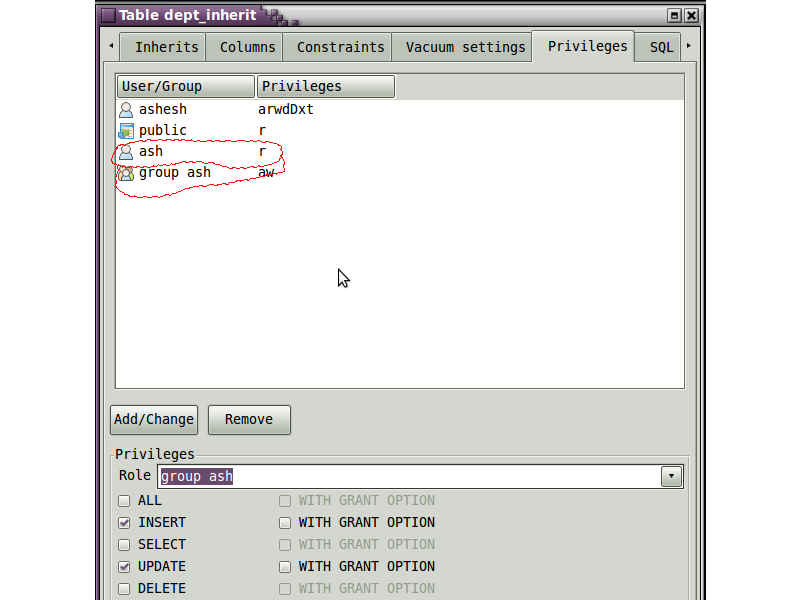
I have attached a screen for it. (dlgTable)
In this case, 'ash' is a group. We were not identify the groups from privileges.
We were able to select multiple privileges for 'group ash' and 'ash' both. :(
I have solved that also.
Please find the updated patch.
Dave Page wrote:
I could not reproduce it on windows (Vista). :(- If the dialog is the default (minimum) size when opened, the privileges pane does not size correctly. Observed on Windows.
Could you please send a screen shot for it?
Done.- If I open the table dialogue on an existing table, and then select a column and click change. and then change an existing ACL entry, the generated SQL includes a REVOKE ALL which revokes privileges from other columns on the table.
There was one problem with GRANT ALL too.
And also found one problem, when privileges are for group, "group " was not
appended in privileges lists (ctlSecurityPanel). I found the same problem on
existing privileges dialogs too. :(
I have attached a screen for it. (dlgTable)
In this case, 'ash' is a group. We were not identify the groups from privileges.
We were able to select multiple privileges for 'group ash' and 'ash' both. :(
I have solved that also.
Please find the updated patch.
--
Вложения
В списке pgadmin-hackers по дате отправления: