Обсуждение: Column property / Drop constraint
Hi again,

1) Clicking on column property makes a segmentation fault:
[root@linus root]# /usr/local/share/pgadmin3/pgAdmin3
le numéro de ligne -1 est hors de l'étendue 0..-1
le numéro de ligne -1 est hors de l'étendue 0..-1
le numéro de ligne -1 est hors de l'étendue 0..-1
le numéro de ligne -1 est hors de l'étendue 0..-1
le numéro de ligne -1 est hors de l'étendue 0..-1
le numéro de ligne -1 est hors de l'étendue 0..-1
le numéro de ligne -1 est hors de l'étendue 0..-1
le numéro de ligne -1 est hors de l'étendue 0..-1
Erreur de segmentation

2) Drop constraint does not work
It seems that the correct syntax is:
ALTER TABLE schema.table DROP CONSTRAINT constraint
and not
ALTER TABLE schema.table DROP CONSTRAINT schema.constraint

Cheers,
Jean-Michel
> -----Original Message-----
> From: Jean-Michel POURE [mailto:jm.poure@freesurf.fr]
> Sent: 26 May 2003 17:17
> To: pgadmin-hackers@postgresql.org
> Subject: [pgadmin-hackers] Column property / Drop constraint
>
> 2) Drop constraint does not work
> It seems that the correct syntax is:
> ALTER TABLE schema.table DROP CONSTRAINT constraint
> and not
> ALTER TABLE schema.table DROP CONSTRAINT schema.constraint

My bad - should be fixed now.

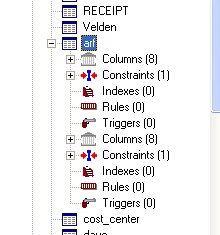
Andreas - notived something odd when looking at this that I haven't
looked at further: when I added a check to a table, it re-added some of
the category sub-nodes again:

Table
  Columns
  Constraints (2)
  Triggers
  Columns
  Constraints (3)
  Triggers

I also had to add the check from the properties dialogue, I couldn't do
it from the context menu, though I could add a unique constraint there.
Dunno if that's related to the gtk issue...

Regards, Dave.
Dave Page wrote:

>
>Andreas - notived something odd when looking at this that I haven't
>looked at further: when I added a check to a table, it re-added some of
>the category sub-nodes again:
>
>Table
>  Columns
>  Constraints (2)
>  Triggers
>  Columns
>  Constraints (3)
>  Triggers
>
>I also had to add the check from the properties dialogue, I couldn't do
>it from the context menu, though I could add a unique constraint there.
>Dunno if that's related to the gtk issue...
>
>
>
Couldn't reproduce this. Please state exactly on which node the
selection was when this happened. And which OS?
Le Mardi 27 Mai 2003 11:57, Andreas Pflug a écrit :
> Couldn't reproduce this. Please state exactly on which node the
> selection was when this happened. And which OS?

I feel sorry to say I was not able to run ./configure successfuly. I am still
running a RedHat 8.0 platform, no Window$ as usual.

CREATE TABLE public.fournisseur_journal
(
  fourjo_oid int4 NOT NULL DEFAULT nextval('fournisseur_journal_seq'::text),
  fourjo_num int2,
  fourjo_datefact date,
  fourjo_datecompta date,
  fourjo_intitule text[],
  fourjo_ht float4,
  fourjo_immo_tva55 float4[],
  fourjo_immo_tva196 float4,
  fourjo_bs_tva55 float4[],
  fourjo_bs_tva196 float4,
  fourjo_ttc float4[],
  fourjo_descriptif text[],
  CONSTRAINT fourjo_pkey PRIMARY KEY (fourjo_oid)
) WITH OIDS;

The error saved in error.log is:
2003-05-27 12:19:54 ERROR  : ERROR:  Bad date external representation ''

I wonder if it is not a localisation problem.

Cheers, Jean-Michel
Le Mardi 27 Mai 2003 11:57, Andreas Pflug a écrit :
> Couldn't reproduce this. Please state exactly on which node the
> selection was when this happened. And which OS?

Dear Friends,

Forget about my last email. I was able to drop constraint using the latest
pgAdmin3 snapshot downloaded today. Thanks.

But I was not able to enter data using the data grid (before primary key
deletion). Here is another example:

CREATE TABLE public.fournisseur_journal_4
(
  fourjo_oid int4 NOT NULL DEFAULT nextval('fournisseur_journal_seq'::text),
  fourjo_num int2,
  fourjo_descriptif text[],
  CONSTRAINT rrrr PRIMARY KEY (fourjo_oid)
) WITH OIDS;

2003-05-27 12:28:14 ERROR  : ERROR:  array_in: Need to specify dimension

Seems like a localisation issue. If I add a date field, the following message
displays:

2003-05-27 12:19:54 ERROR  : ERROR:  Bad date external representation ''

Cheers,
Jean-Michel
> -----Original Message-----
> From: Andreas Pflug [mailto:Andreas.Pflug@web.de]
> Sent: 27 May 2003 10:57
> To: Dave Page; pgadmin-hackers@postgresql.org
> Subject: Re: [pgadmin-hackers] Column property / Drop constraint
>
>
> Couldn't reproduce this. Please state exactly on which node the
> selection was when this happened. And which OS?

OK:

1) Browse to a table, and expand its node to expose Columns, Constraints
etc.
2) Right-click the table and select properties.
3) Add a check constraint.

See the attachment for the results. This was on Windows XP.

Regards, Dave.
Вложения
Dave Page wrote:

>1) Browse to a table, and expand its node to expose Columns, Constraints
>etc.
>2) Right-click the table and select properties.
>3) Add a check constraint.
>
Got it.
Refresh of node didn't drop subnodes, so they were added another time.
Fixed.

Regards,
Andreas